
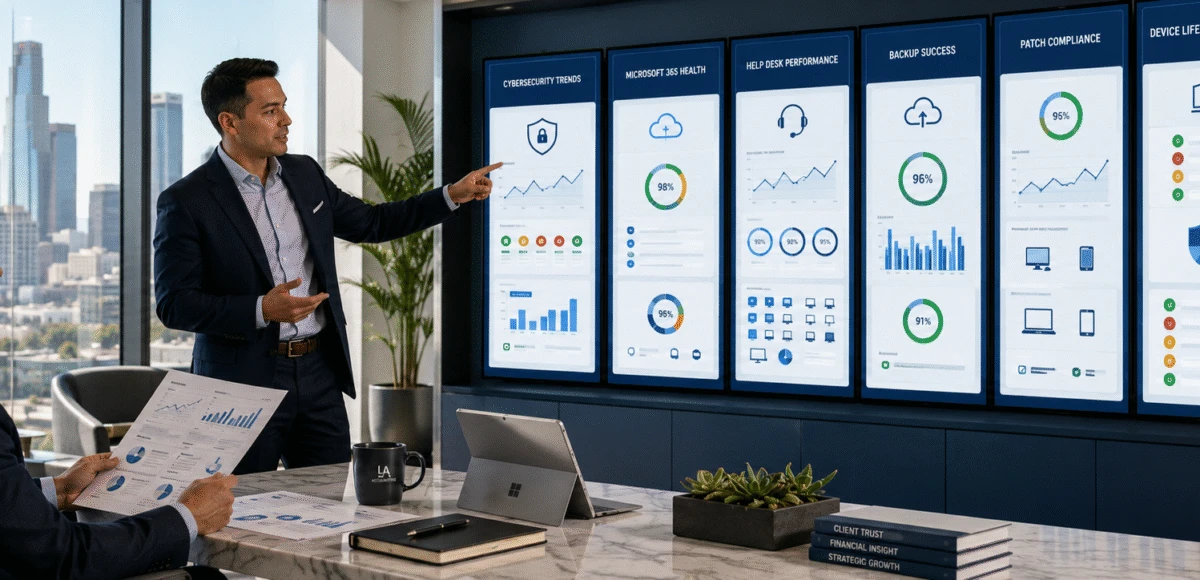
Monthly IT Reports Accounting Firms Should Receive

Many accounting firms receive a monthly invoice from their Managed IT Services Provider but little meaningful information about the health of their technology environment.
Executive reporting should do far more than summarize help desk activity.
A well-designed monthly IT report helps leadership understand cybersecurity risks, technology performance, Microsoft 365 health, backup reliability, hardware planning, and strategic priorities. It should answer a simple question:
“Is our technology helping our business operate securely, efficiently, and reliably?”
For accounting firms throughout Los Angeles County and Greater Los Angeles, where technology directly supports client service, regulatory obligations, and business continuity, executive reporting provides the visibility needed to make informed operational and budgeting decisions.
Why Executive Reporting Matters
Most accounting firm leaders are not interested in reviewing hundreds of technical alerts.
Instead, they want clear answers to business questions such as:
- Are we becoming more secure?
- Is our technology becoming more reliable?
- Are employees receiving timely support?
- What risks require leadership attention?
- What should we budget for next?
- Is our Managed IT Services Provider delivering value?
Good reporting transforms technical data into executive insight.
Rather than focusing on isolated incidents, leadership gains visibility into long-term trends and operational performance.
Why This Matters
Technology is one of your firm’s largest operational investments.
Without meaningful reporting, leadership has little objective information for evaluating that investment.
The Seven Executive Reports Every Accounting Firm Should Receive
Rather than reviewing dozens of technical reports, leadership should receive a concise executive dashboard covering the seven areas that matter most.
Report #1 — Executive Technology Health Summary
Every monthly report should begin with a high-level executive overview.
This section answers one question:
“How healthy is our technology environment?”
A strong executive summary typically includes:
- Overall technology health
- Significant incidents
- Major accomplishments
- Emerging risks
- Open priorities
- Strategic recommendations
The purpose is to help firm leadership quickly understand whether technology performance is improving, remaining stable, or requiring attention.
Executive Planning Tip
If the first page of your monthly report cannot be understood without technical expertise, it probably isn’t an executive report.
Decision Table
| Executive Question | Report Should Answer |
|---|---|
| Are our systems healthy? | Overall technology status |
| Are major risks increasing? | Risk summary |
| What should leadership know? | Executive recommendations |
| What actions are required? | Priority initiatives |
Report #2 — Cybersecurity Dashboard
Cybersecurity should be presented in language that business leaders understand.
Rather than overwhelming leadership with technical details, reports should summarize:
- Security incidents
- Phishing trends
- Endpoint protection status
- Microsoft 365 security alerts
- Identity protection activity
- Vulnerability trends
- User awareness training completion
- Risk improvements since last month
Why This Matters
Cybersecurity reporting allows leadership to evaluate progress over time rather than reacting only after an incident occurs.
A good dashboard answers:
“Are we becoming more secure each month?”
Report #3 — Help Desk Performance and Employee Experience
Help desk reporting should measure more than the number of completed tickets.
Leadership wants to understand whether employees are receiving timely, effective support that enables them to remain productive.
A monthly report should include:
- Total support requests
- Average first response time
- Average resolution time
- Ticket trends
- Recurring issues
- Employee satisfaction (if measured)
- Escalated issues
- After-hours support activity
These metrics help leadership identify whether technology support is improving, remaining consistent, or beginning to affect business operations.
Why This Matters
A growing backlog of unresolved support requests may indicate understaffing, recurring infrastructure issues, or service quality concerns that deserve executive attention before they affect productivity.
Executive KPI Snapshot
| KPI | Healthy Target | Executive Concern |
|---|---|---|
| First Response Time | Within SLA | Regular delays |
| Resolution Time | Improving or stable | Increasing month over month |
| Recurring Issues | Declining | Same issues repeatedly reported |
| Employee Satisfaction | High and consistent | Declining feedback |
Report #4 — Backup and Business Continuity Status
Firm leadership should never have to wonder whether backups are working.
Executive reporting should summarize:
- Backup success rates
- Failed backup jobs
- Restore testing results
- Recovery readiness
- Disaster recovery testing
- Business continuity improvements
- Recovery objectives (RTO/RPO) status
The emphasis should remain on operational readiness rather than technical detail.
Executive Planning Tip
Ask your MSP one simple question every quarter:
“When was our last successful backup restoration test?”
If the answer isn’t immediate and documented, that should become a priority discussion.
Report #5 — Microsoft 365 Health and Cloud Security
Microsoft 365 is the operational hub for many accounting firms.
Monthly reporting should provide visibility into:
- Identity protection
- Multi-Factor Authentication adoption
- Conditional Access activity
- Microsoft Defender alerts
- SharePoint permissions
- External sharing activity
- Teams governance
- License utilization
- Security recommendations
Rather than reviewing individual alerts, leadership should receive trend analysis that highlights improvements, unresolved risks, and recommended next steps.
Why This Matters
Cloud environments evolve continuously. Executive reporting helps ensure Microsoft 365 remains aligned with the firm’s security policies, operational requirements, and future technology roadmap.
Report #6 — Technology Lifecycle and Asset Planning
Technology should never become a surprise expense.
An executive report should include visibility into hardware and infrastructure that will require attention over the next 12–36 months.
Typical reporting includes:
- Device inventory
- Hardware approaching end of support
- Warranty status
- Planned workstation replacements
- Firewall lifecycle
- Network equipment lifecycle
- Budget forecasts
Leadership can then incorporate technology investments into annual budgeting instead of reacting to unexpected failures.
Decision Table
| Executive Question | Report Should Answer |
|---|---|
| What equipment should we replace next year? | Hardware lifecycle summary |
| Are we carrying unnecessary technology risk? | End-of-support devices |
| Can we budget proactively? | Multi-year replacement forecast |
Report #7 — Strategic Recommendations and Technology Roadmap
The final section of every monthly executive report should answer:
“What should we do next?”
Rather than simply describing what happened during the previous month, a strategic Managed IT Services Provider should identify future priorities.
Examples include:
- Microsoft 365 improvements
- Cybersecurity initiatives
- Business continuity enhancements
- Hardware refresh planning
- AI governance initiatives
- Cloud optimization
- Compliance preparation
- Operational efficiency opportunities
This transforms reporting from historical documentation into strategic business guidance.
Key Insight
A monthly IT report should not end with statistics.
It should end with recommendations.
Sample Executive Dashboard
A concise monthly dashboard might include:
| Category | Executive Summary |
|---|---|
| Overall Technology Health | Stable with two medium-priority recommendations |
| Cybersecurity | No critical incidents. MFA adoption complete. Two Microsoft 365 improvements recommended. |
| Help Desk | Response times within SLA. Ticket volume decreased 8% from the previous month. |
| Business Continuity | Backups successful. Quarterly restore testing completed successfully. |
| Microsoft 365 | Identity protection is healthy. External sharing policies under review. |
| Hardware | Four employee laptops scheduled for replacement next quarter. |
| Strategic Priorities | AI governance planning and firewall lifecycle review recommended. |
This type of summary allows leadership to understand the firm’s technology posture in minutes rather than reviewing dozens of pages of technical detail.
Technology Performance Scorecard
In addition to narrative reporting, leadership benefits from tracking a small number of consistent performance indicators.
Examples include:
| Performance Area | Goal |
|---|---|
| Help Desk Responsiveness | Consistently meeting SLA targets |
| Cybersecurity Maturity | Improving each quarter |
| Microsoft 365 Security | All recommended controls implemented |
| Backup Reliability | 100% monitored success with regular restore testing |
| Business Continuity | Annual review and documented testing |
| Strategic Planning | Quarterly Business Reviews completed on schedule |
Monitoring these trends over time provides greater insight than evaluating individual monthly statistics in isolation.
Board-Ready Reporting Checklist
Review this checklist with your Managed IT Services Provider.
Executive Summary
☐ Overall technology health
☐ Key accomplishments
☐ Emerging risks
☐ Executive recommendations
Cybersecurity
☐ Security trend summary
☐ Microsoft 365 health
☐ Vulnerability updates
☐ User awareness progress
Operations
☐ Help desk KPIs
☐ Backup status
☐ Restore testing
☐ Business continuity updates
Strategic Planning
☐ Hardware lifecycle forecast
☐ Technology roadmap updates
☐ Budget recommendations
☐ AI readiness initiatives
Common Reporting Mistakes
Many accounting firms receive reports that provide large amounts of data but little practical insight.
Common reporting shortcomings include:
- Reporting Ticket Counts Without Business Context
- Knowing that 126 tickets were resolved offers limited value unless leadership understands the underlying trends and operational impact.
- Focusing Only on Technical Metrics
- Executive reports should explain how technology affects productivity, cybersecurity, budgeting, and client service, not simply list system statistics.
- Never Identifying Strategic Priorities
- Monthly reports should include clear recommendations for future improvements rather than only documenting completed work.
- Omitting Technology Planning
- Leadership should know what technology investments are approaching and how they fit into the firm’s long-term roadmap.
- Reporting Only After Problems Occur
- The best reports identify emerging risks before they become operational issues.
Cost Expectations
Executive reporting is commonly included as part of a comprehensive Managed IT Services agreement.
For accounting firms with 20–100 employees, reporting may include:
- Monthly executive dashboards
- Quarterly Business Reviews (QBRs)
- Technology roadmap updates
- Cybersecurity reporting
- Hardware lifecycle planning
- Budget forecasting
When comparing Managed IT Services Providers, firms should evaluate not only the frequency of reporting but also its relevance to executive decision-making.
A monthly IT report should answer one question above all others: “Is our technology becoming a stronger business asset or a growing business risk?”
Why Executive Reporting Matters in Los Angeles
Accounting firms throughout Los Angeles County and Greater Los Angeles operate in a fast-paced environment where technology directly affects client responsiveness, tax deadlines, employee productivity, and cybersecurity.
Executive reporting helps leadership stay informed without becoming overwhelmed by technical details. By combining operational metrics with strategic recommendations, firms gain the visibility needed to budget effectively, manage risk, and ensure technology continues supporting business growth rather than simply maintaining day-to-day operations.
Real-World Scenario
How Executive Reporting Helped a Los Angeles Accounting Firm Make Better Technology Decisions
A mid-sized accounting firm in Los Angeles County had worked with the same Managed IT Services Provider for several years. The firm received monthly invoices and occasional updates when significant issues occurred, but leadership had very little visibility into the overall health of its technology environment.
During an annual strategic planning session, one of the managing partners asked:
“How do we actually know whether our IT investment is improving the business?”
The question prompted a review of the firm’s reporting process.
Although the MSP responded to support requests promptly, leadership realized it rarely received information about:
- Cybersecurity trends
- Microsoft 365 security posture
- Backup testing results
- Technology lifecycle planning
- Recurring support issues
- Strategic technology recommendations
- Long-term budgeting priorities
Working together, the firm and its technology provider redesigned the monthly executive report to focus on business outcomes rather than technical statistics.
The revised dashboard highlighted technology health, cybersecurity progress, hardware replacement planning, support performance, and quarterly strategic priorities.
As a result, leadership gained greater confidence in technology planning, budgeting discussions became more predictable, and IT became a regular topic during executive meetings rather than only after problems occurred.
This example demonstrates that effective reporting does more than summarize activity. It helps leadership make informed business decisions.
Executive Decision Framework
Use the following framework to evaluate whether your current Managed IT Services Provider is delivering executive-level reporting.
If You Only Receive Invoices and Ticket Summaries
Your firm is likely missing strategic visibility.
Recommended next steps:
- Request a monthly executive dashboard.
- Review cybersecurity metrics.
- Discuss technology planning.
- Schedule Quarterly Business Reviews (QBRs).
If You Receive Technical Reports
Translate technical data into business insight.
Reports should explain:
- Business impact
- Technology risks
- Budget implications
- Strategic recommendations
- Operational trends
If You Already Receive Executive Dashboards
Expand reporting to support long-term planning.
Include:
- Technology lifecycle forecasts
- AI readiness updates
- Microsoft 365 governance
- Business continuity metrics
- Quarterly technology roadmap reviews
If Executive Reporting Is Fully Mature
Use reporting to guide continuous improvement.
Leadership should evaluate:
- Long-term technology investments
- Operational efficiency
- Cybersecurity maturity
- Business resilience
- Technology ROI
- Strategic priorities for the coming quarter
Boardroom Questions Every Managing Partner Should Ask
Technology reporting should help answer business questions and not simply describe technical activity.
During your next Quarterly Business Review, consider asking:
- Are our technology risks increasing or decreasing?
- Which cybersecurity improvements have been completed this quarter?
- What are the three most important technology priorities for the next 90 days?
- Which hardware should we budget to replace over the next 12–24 months?
- How has Microsoft 365 security improved since our last review?
- What recurring support issues should leadership know about?
- Are we meeting our business continuity objectives?
- How will upcoming technology investments support the firm’s growth?
If your current reports do not answer these questions, they may not be providing the executive insight your leadership team needs.
Conclusion
Technology reporting should provide much more than operational statistics.
For accounting firms throughout Los Angeles County and Greater Los Angeles, executive reporting creates visibility into cybersecurity, operational performance, budgeting, business continuity, and long-term technology planning.
Rather than asking leadership to interpret technical data, a well-designed monthly dashboard translates information into meaningful business insight.
The best Managed IT Services Providers do more than resolve technical issues. They help leadership understand technology’s role in achieving the firm’s strategic objectives.
When executive reporting is delivered consistently, technology becomes easier to manage, easier to budget, and easier to align with business growth.
Does your accounting firm receive meaningful executive reporting or just monthly invoices?
Fothion helps accounting firms throughout Los Angeles County and Greater Los Angeles develop executive reporting dashboards that provide leadership with clear visibility into cybersecurity, technology performance, budgeting, and long-term strategic planning.
A structured reporting process enables your leadership team to make more informed technology decisions and better measure the value of your IT investment.
Book a 30-minute call with Fothion: https://www.fothion.com/schedule-a-phone-call/
- Frequently Asked Questions
- What should be included in a monthly IT report?
- A monthly executive IT report should include an overall technology health summary, cybersecurity metrics, help desk performance, backup and business continuity status, Microsoft 365 health, hardware lifecycle planning, and strategic recommendations.
- How often should accounting firms review IT performance?
- Executive dashboards should be reviewed monthly, while more detailed strategic planning discussions should occur quarterly through Quarterly Business Reviews (QBRs).
- Should non-technical leaders receive technical reports?
- Not directly. Reports intended for leadership should focus on business outcomes, risks, trends, and recommendations rather than detailed technical data or system logs.
- What KPIs should an accounting firm monitor?
- Useful executive KPIs include:
- Help desk response and resolution times
- Cybersecurity trends
- Backup success rates
- Microsoft 365 security health
- Hardware lifecycle status
- Employee support trends
- Technology project progress
- Why are Quarterly Business Reviews important?
- Quarterly Business Reviews help align technology planning with business goals, allowing leadership to review risks, budgets, cybersecurity improvements, and upcoming initiatives on a regular basis.
- Should executive reports include cybersecurity metrics?
- Yes. However, cybersecurity information should be presented in business terms that explain risk, progress, and recommended actions rather than overwhelming readers with technical details.
- Can reporting help reduce technology costs?
- Yes. Executive reporting supports better budgeting by identifying aging hardware, recurring support issues, licensing trends, and strategic investment opportunities before they become emergency expenses.
- Is executive reporting normally included with Managed IT Services?
- Many strategic Managed IT Services Providers include executive dashboards and Quarterly Business Reviews as part of their service agreements. Firms should confirm the frequency, format, and scope of reporting before selecting a provider.
Leave a Comment